How to Structure Your Dental Website for Higher Google Rankings
Posted on 2/13/2026 by WEO Media |
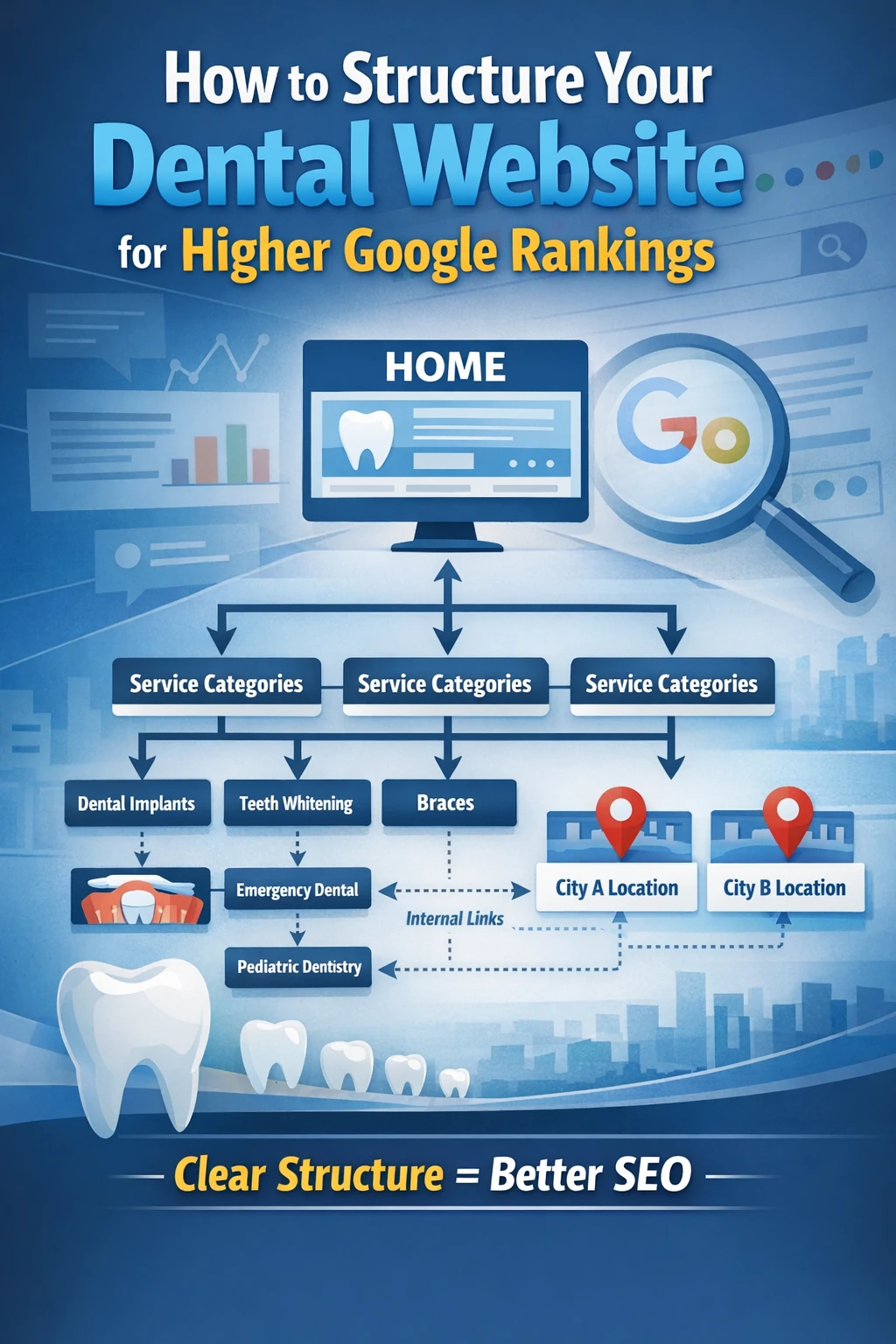 How you structure your dental website has a direct impact on your Google rankings—and it’s one of the most overlooked factors in dental SEO. Most practices focus on keywords and content volume while ignoring the site architecture underneath, which is often why competitors with less content outrank them. A well-structured dental website helps Google understand what your practice does, where you do it, and which pages matter most. When your site hierarchy is clear, Google can crawl it efficiently, index the right pages, and serve them to patients searching in your area. How you structure your dental website has a direct impact on your Google rankings—and it’s one of the most overlooked factors in dental SEO. Most practices focus on keywords and content volume while ignoring the site architecture underneath, which is often why competitors with less content outrank them. A well-structured dental website helps Google understand what your practice does, where you do it, and which pages matter most. When your site hierarchy is clear, Google can crawl it efficiently, index the right pages, and serve them to patients searching in your area.
The connection is direct: structure determines how dental SEO authority flows through your site. If your service pages are buried three or four clicks deep, if your navigation lumps twenty treatments under one dropdown, or if your URLs read like random strings, Google struggles to prioritize your most important content. The result is pages that never rank—even when the content itself is strong. A pattern we commonly see in dental website audits is solid content trapped inside poor architecture, producing rankings well below the site’s actual potential.
If your website traffic is growing but new patient calls aren’t, the issue may be your intake process rather than your site structure. Start there if conversion is the bottleneck.
Below, you’ll learn how to audit and improve your dental website’s structure using a clear hierarchy model: homepage → service categories → individual treatment pages → supporting content. We’ll cover the core pages every dental site needs, URL formatting, internal linking strategy, location page architecture, and the most common structural mistakes that suppress rankings—along with a self-assessment you can run in under 30 minutes.
Written for: dental practice owners, office managers, and marketing teams who want their website to rank better in Google without relying solely on paid ads or content volume.
TL;DR
If you only do five things, do these:
| • |
Build a clear page hierarchy - homepage → service categories → individual treatment pages → supporting blog content, with no important page more than three clicks from the homepage
|
| • |
Give every promoted service its own page - don’t combine dental implants, veneers, and crowns on one “restorative” page if you want each to rank independently
|
| • |
Use clean, descriptive URLs - /cosmetic-dentistry/teeth-whitening/ tells Google and patients exactly what the page covers; /page?id=4372 does not
|
| • |
Link between related pages intentionally - internal links pass authority and help Google understand which pages are most important on your site
|
| • |
Audit your structure before adding more content - new blog posts won’t rank well on a site where Google can’t efficiently crawl and prioritize existing pages |
Table of Contents
Why website structure affects your dental SEO rankings
Google uses automated crawlers to discover and index web pages. When those crawlers visit your dental website, they follow links from page to page, building a map of your site’s content and hierarchy. A clear structure makes that map easy to build. A messy structure forces Google to guess—and guessing usually means your most important pages get less visibility than they deserve.
Three things happen when your site structure is well-organized. First, Google can crawl more efficiently, spending its limited crawl budget on pages that matter rather than getting stuck in loops or dead ends. Second, Google can understand topical relationships between your pages—recognizing that your teeth whitening page belongs under cosmetic dentistry, which sits under your main service offering. Third, the authority your site earns from backlinks, patient reviews, and domain age flows more effectively to the pages you want to rank.
In our work with dental practices, we frequently find that ranking improvements of 10–30 positions happen after restructuring alone—without adding a single new page or blog post. The content was already strong; it was the architecture holding it back. If you’re weighing whether SEO is worth the investment, fixing structure first is often the fastest path to proving ROI.
Think of it like a well-organized office: if a patient walks in and the signage is clear, the front desk knows where to direct them, and every room is labeled, the visit runs smoothly. If there’s no signage, rooms are mislabeled, and hallways lead nowhere, even a great clinical team can’t deliver a good experience. Google’s crawlers work the same way.
> Back to Table of Contents
The core pages every dental website needs
Before optimizing structure, you need the right pages in place. Missing a core page creates a gap that no amount of blog content can fill. Here are the foundational pages that form your site’s structural backbone:
| • |
Homepage - your site’s authority hub; it should link clearly to your main service categories, location(s), and primary conversion paths (phone number, appointment request). Your homepage design and layout directly affects both rankings and patient conversions
|
| • |
About/Meet the Team page - establishes E-E-A-T signals (experience, expertise, authoritativeness, trustworthiness) that Google evaluates for health-related queries
|
| • |
Service category pages - one page per major category (general dentistry, cosmetic dentistry, restorative dentistry, orthodontics, etc.) that links down to individual treatment pages
|
| • |
Individual treatment/service pages - dedicated pages for each service you want to rank for (dental implants, teeth whitening, Invisalign, emergency dental care, etc.)
|
| • |
Location page(s) - one per physical office with name, address, phone, hours, embedded map, and location-specific content
|
| • |
Contact/appointment request page - clear conversion path with form, phone number, and office details featuring strong calls to action
|
| • |
Blog/resource section - supporting content that targets long-tail queries and links back to service pages, filling content gaps competitors miss
|
| • |
Patient reviews/testimonials page - trust signal that supports both conversions and E-E-A-T |
A common gap we find: practices that offer dental implants, All-on-4, and implant-supported dentures but have only one “Implants” page covering all three. Each of these is a distinct search query with distinct patient intent. Combining them on one page forces that page to compete for multiple keywords simultaneously—and it usually ranks poorly for all of them.
> Back to Table of Contents
How to organize your service pages for SEO
The most effective dental website structure follows a hub-and-spoke model: a service category page (the hub) links to individual treatment pages (the spokes), and those spokes link back to the hub and to each other where relevant.
Here’s what this looks like in practice:
| • |
Cosmetic Dentistry (hub page) - overview of your cosmetic services, links to each individual treatment page below
|
| • |
Teeth Whitening (spoke) - dedicated page targeting “teeth whitening [city]” and related queries
|
| • |
Porcelain Veneers (spoke) - dedicated page targeting “veneers [city]” and related queries
|
| • |
Dental Bonding (spoke) - dedicated page targeting “dental bonding [city]” and related queries
|
| • |
Smile Makeover (spoke) - dedicated page targeting “smile makeover [city]” and related queries |
Each spoke page should link back to the Cosmetic Dentistry hub and cross-link to related spokes where it makes sense for the reader. For example, your Veneers page might mention bonding as an alternative for minor chips, linking to that page naturally within the content.
How deep is too deep?
A good rule for dental websites: no important page should be more than three clicks from the homepage. If a patient (or Google’s crawler) has to click through four or five pages to reach your dental implants page, that page receives less crawl priority and less internal link authority.
Map it out simply: Homepage → Restorative Dentistry → Dental Implants. That’s two clicks. Add the homepage’s main navigation linking directly to your top service categories, and most of your service pages become reachable in two clicks. Your blog posts and supporting content can sit at the third level without issues.
One service, one page
Resist the urge to combine multiple services onto a single page for the sake of a shorter menu. If your practice actively markets dental implants, All-on-4, and implant-supported dentures, each needs its own page. Google treats each page as a potential answer to a specific search query. One page trying to answer three different queries dilutes its relevance for all of them.
The exception: if you offer a service but don’t actively market it and it generates minimal search volume in your area, it’s reasonable to include it as a section on a parent category page rather than creating a standalone page with thin content.
> Back to Table of Contents
URL structure that helps Google understand your site
Your URLs are part of your site’s structure—they tell Google (and patients) what a page is about before the page even loads. Clean, descriptive URLs consistently outperform cryptic or auto-generated ones for dental websites.
What good dental website URLs look like:
| • |
Homepage - yourdomain.com
|
| • |
Service category - yourdomain.com/cosmetic-dentistry/
|
| • |
Individual service - yourdomain.com/cosmetic-dentistry/teeth-whitening/
|
| • |
Location page - yourdomain.com/locations/city-name/
|
| • |
Blog post - yourdomain.com/blog/topic-keyword-phrase/ |
What to avoid:
| • |
Parameter-heavy URLs - yourdomain.com/page?id=4372&cat=12 gives Google no content signals
|
| • |
Excessively long URLs - yourdomain.com/services/dental-services/cosmetic-dental-services/professional-teeth-whitening-services/ adds no SEO value over a shorter version
|
| • |
Duplicate content paths - the same teeth whitening page accessible at /services/whitening/ and /cosmetic/teeth-whitening/ confuses Google about which to index
|
| • |
Dates in service page URLs - yourdomain.com/2024/01/teeth-whitening/ makes evergreen content look time-bound |
If your site already has established URLs with decent rankings, don’t change them without setting up proper 301 redirects. Restructuring URLs without redirects can temporarily (and sometimes permanently) drop rankings for affected pages. Plan URL changes as part of a larger site restructure with proper redirect mapping. For a full walkthrough, our guide to technical SEO for dentists covers redirect implementation in detail.
> Back to Table of Contents
Internal linking strategy for dental websites
Internal links are how authority flows through your website. Every link from one page to another passes a signal to Google that says “this page is important and related to this topic.” Without a deliberate internal linking strategy, that authority scatters randomly—or pools on pages that don’t need it (like your privacy policy, which every page links to from the footer).
| 1. |
Link from high-authority pages to high-priority pages - your homepage has the most authority on your site; make sure it links directly to your most important service category pages, not just through the navigation menu but within the page content itself
|
| 2. |
Link from blog posts to relevant service pages - if you publish a blog post about “signs you need a dental implant,” it should link to your dental implants service page with descriptive anchor text like “learn more about our dental implant process”—not “click here”
|
| 3. |
Cross-link related service pages - your Invisalign page can link to your traditional braces page (“comparing your options?”) and your retainers page (“what happens after treatment”); this builds a topical cluster that signals expertise to Google |
This linking structure mirrors how the dental marketing funnel works: blog content at the top of the funnel captures awareness-stage searches, then internal links guide visitors deeper into your service pages where they convert.
Anchor text matters
The clickable text of your internal links tells Google what the destination page is about. Descriptive anchor text outperforms generic text every time. In our dental website audits, we commonly find internal links using “click here,” “learn more,” or “read more” as anchor text—all of which waste an opportunity to reinforce the target page’s relevance.
Instead of “Click here to learn about our whitening services,” use “Our professional teeth whitening options can brighten your smile by several shades.” The link text itself contains the keywords you want that page to rank for. The same principle applies to how your website messaging influences case acceptance—every word on the page works toward a purpose.
How many internal links per page?
There’s no magic number, but a practical guideline: each service page should have at least 3–5 internal links pointing to it from other relevant pages on your site. For your highest-priority services (the ones you actively market and want to rank for), aim for more. Blog posts are your best tool here—every relevant post is an opportunity to add another internal link to a key service page.
Review your site’s internal link distribution quarterly. If your dental implants page has 15 internal links pointing to it but your Invisalign page has only 2, that imbalance tells Google which page you consider more important—whether that’s your intention or not. A periodic SEO audit can reveal these imbalances quickly.
> Back to Table of Contents
Location pages for multi-location practices
If your practice operates from more than one office, each location needs its own dedicated page—and that page needs to be more than just an address and a map embed. Google evaluates location pages for relevance and depth just like any other page on your site. Practices with multiple locations have a unique marketing advantage when each office page is built correctly.
What an effective dental location page includes:
| • |
Full NAP (name, address, phone) - consistent with your Google Business Profile listing, formatted in plain text (not embedded in an image)
|
| • |
Office hours - current and accurate, including any differences from your other locations
|
| • |
Embedded Google Map - showing your exact location with a pin
|
| • |
Unique location-specific content - at least 200–300 words describing the office, the neighborhood, parking or transit access, and the services offered at that specific location
|
| • |
Location-specific schema markup - LocalBusiness or Dentist schema with the correct address, phone, and geo-coordinates for each office
|
| • |
Links to service pages - connecting the location to the treatments available there |
The critical mistake with multi-location pages is duplicating the same content across all locations and only swapping the city name. Google recognizes this pattern and may filter the duplicate pages from results. Each location page needs genuinely unique content—even if the services are identical across offices, the descriptions, team references, and neighborhood details should differ.
Beyond your main location pages, building service area pages for nearby cities extends your visibility into surrounding communities without requiring a physical office in each one. These geo-targeted pages should follow the same structural principles—unique content, proper schema, and clear internal links back to your core service pages. For a deeper look at how Google evaluates local dental rankings, including proximity, relevance, and prominence, see our guide to the local SEO factors that drive Map Pack visibility.
> Back to Table of Contents
Technical structure essentials
Beyond your page hierarchy and content organization, several technical elements affect how Google interprets and ranks your site. These factors also influence whether your content surfaces in AI-generated search results, which are reshaping how dental practices earn visibility in Google’s AI era. For a comprehensive walkthrough, our complete technical SEO guide covers each area in depth.
XML sitemap
Your sitemap is your site’s table of contents for search engines. It should list every page you want Google to index—and exclude pages you don’t (like thank-you pages, duplicate content, or internal search results). Submit your sitemap through Google Search Console and update it automatically whenever pages are added or removed.
Schema markup
Structured data helps Google understand what your pages represent. For dental websites, the most valuable schema markup types include:
| • |
LocalBusiness or Dentist schema - on your homepage and location pages, with name, address, phone, hours, and geo-coordinates
|
| • |
FAQPage schema - on pages with FAQ sections, enabling rich results in Google search
|
| • |
Service schema - on individual treatment pages, identifying the specific service offered
|
| • |
BreadcrumbList schema - showing Google the hierarchical path to each page (Home → Cosmetic Dentistry → Teeth Whitening) |
Mobile-first indexing
Google uses the mobile version of your site for indexing and ranking. If your mobile navigation hides important links, collapses key content behind accordions that Google can’t access, or loads differently than your desktop version, your rankings will reflect the mobile experience—not the desktop one. As of mid-2024, mobile-first indexing is the universal default for 100% of websites, so there are no exceptions.
Site speed and Core Web Vitals
Structural decisions affect load time. Deep nesting, excessive JavaScript-rendered navigation, large uncompressed images, and bloated page templates all slow your site down. Google uses Core Web Vitals—Largest Contentful Paint (LCP), Interaction to Next Paint (INP), and Cumulative Layout Shift (CLS)—as ranking signals. A well-structured site with clean code loads faster by default. If speed is an issue, these website speed fixes can make an immediate difference in both rankings and patient conversion rates.
Breadcrumb navigation
Breadcrumbs give both users and Google a visible trail showing where a page sits in your hierarchy. For dental sites, breadcrumbs like Home → Services → Cosmetic Dentistry → Teeth Whitening reinforce your topical structure and generate additional internal links automatically. Implementing BreadcrumbList schema markup alongside visible breadcrumbs increases the likelihood of enhanced display in Google search results.
> Back to Table of Contents
Common dental website structure mistakes
In our experience auditing dental websites, these structural problems appear most frequently—and they consistently correlate with underperformance in Google rankings.
| 1. |
Mega-page syndrome - cramming five or more distinct services onto one page instead of giving each its own URL; this dilutes keyword targeting and makes it nearly impossible to rank for any single service
|
| 2. |
Orphan pages - pages that exist on your site but have no internal links pointing to them; Google may never find these pages, or it may deprioritize them because nothing on your site signals they’re important
|
| 3. |
Flat navigation with no hierarchy - listing every service page directly in the main navigation with no category grouping; this overwhelms users and prevents Google from understanding topical relationships
|
| 4. |
Duplicate content across locations - copy-pasting the same service descriptions across multiple location-specific pages; Google filters these as duplicates, often indexing only one version
|
| 5. |
Blog content with no internal links to service pages - publishing blog posts that never link to the services they discuss; this wastes the authority those posts earn and creates content islands disconnected from your core pages
|
| 6. |
Broken or circular redirect chains - old URLs redirecting to other old URLs that redirect again; each hop loses authority, and chains of three or more redirects may not be followed at all
|
| 7. |
Important content behind tabs or accordions - content hidden in JavaScript-rendered tabs may not be indexed by Google at all, especially on mobile where Google’s crawler expects content to be visible by default
|
| 8. |
Missing accessibility fundamentals - beyond being a legal concern, ADA compliance gaps like missing alt text, broken heading hierarchy, and inaccessible forms also create crawling issues that suppress rankings |
A quick test: open your website in an incognito browser window. Can you reach your most important service page in two clicks or fewer from the homepage? Can you tell from the URL alone what a page is about? If either answer is no, you likely have a structural issue affecting your rankings. For more quick wins to jump competitors in Google, structural fixes are usually the highest-impact starting point.
> Back to Table of Contents
Site structure self-assessment
Use this checklist to evaluate your dental website’s current structure. Score one point for each item that is true. This should take about 20–30 minutes with your site open in one tab and Google Search Console in another.
| 1. |
Every service you actively market has its own dedicated page (not combined with other services)
|
| 2. |
Service pages are organized under category hubs (e.g., individual cosmetic treatments under a Cosmetic Dentistry parent page)
|
| 3. |
No important page is more than three clicks from the homepage
|
| 4. |
URLs are clean, descriptive, and follow a consistent folder structure
|
| 5. |
Each service page has at least 3–5 internal links pointing to it from other pages on your site
|
| 6. |
Blog posts link to relevant service pages with descriptive anchor text
|
| 7. |
Your XML sitemap is current and submitted in Google Search Console with no errors
|
| 8. |
Schema markup is implemented on your homepage, location pages, and service pages
|
| 9. |
Each physical location has its own page with unique content (if multi-location)
|
| 10. |
Your site loads in under 3 seconds on mobile and passes Core Web Vitals in Google Search Console |
Scoring:
8–10: Your site structure is strong. Focus on content quality, growing organic traffic, and link building to improve rankings further.
5–7: Your foundation is decent but structural gaps are likely limiting your ranking potential. Prioritize the items you scored zero on—these are your highest-impact fixes.
0–4: Structure is likely a significant factor in your ranking performance. A comprehensive site restructure should be considered before investing heavily in new content or paid advertising.
Results depend on your market, competition level, and domain history. This assessment identifies structural opportunities—not guaranteed outcomes.
> Back to Table of Contents
Ready to improve your website structure?
If your self-assessment revealed structural gaps, you don’t have to fix everything at once. Start with the highest-impact items: giving key services their own pages, cleaning up internal links, and ensuring your hierarchy follows a logical three-click-maximum path.
For practices that want a professional structural audit and implementation plan, WEO Media’s dental SEO team can evaluate your site’s architecture and build a prioritized roadmap for improvement. Call us at 888-246-6906 or schedule a consultation to discuss your website’s structure and ranking potential.
> Back to Table of Contents
FAQs
How many pages should a dental website have?
There is no fixed number, but most dental practices need at least 15–30 pages as a baseline: a homepage, about/team page, contact page, one page per actively marketed service (typically 8–15 services), location page(s), and a blog section. The goal is one dedicated page for every distinct service you want to rank for in Google, plus supporting content that builds topical authority.
Does changing my dental website’s URL structure hurt SEO?
It can cause temporary ranking fluctuations if not handled properly. The key is implementing 301 redirects from every old URL to its new equivalent before making changes live. With proper redirects, most sites recover within a few weeks and often see improved rankings once Google processes the cleaner structure. Without redirects, you risk losing accumulated authority on affected pages.
Should I use subdomains or subdirectories for my dental blog?
Subdirectories (yourdomain.com/blog/) are almost always the better choice for dental websites. Content on a subdirectory inherits and contributes to the authority of your main domain. A subdomain (blog.yourdomain.com) is often treated as a separate entity by Google in practice, which means your blog content may build authority in isolation rather than strengthening your core service pages.
How do I know if my dental website has orphan pages?
Use a crawl tool like Screaming Frog or Sitebulb to crawl your entire site and compare the crawled pages against your XML sitemap and Google Search Console index report. Pages that appear in your sitemap or index but were not discovered during the crawl are likely orphan pages—they exist but have no internal links pointing to them.
What is the best navigation structure for a dental website?
A top-level navigation with 5–7 main items works best for most dental practices: services (with a dropdown organized by category), about/team, locations, patient resources, blog, and contact. The services dropdown should group individual treatments under category headings (cosmetic, restorative, general) rather than listing every treatment as a separate top-level navigation item.
How often should I audit my dental website’s structure?
A thorough structural audit once or twice per year is sufficient for most practices. However, you should review internal links and sitemap accuracy quarterly, and check for broken links or redirect chains monthly. Any time you add new services, open a new location, or redesign your site, a structural review should be part of the process.
Do breadcrumbs help dental website SEO?
Yes. Breadcrumbs provide two SEO benefits: they create additional internal links that reinforce your site’s hierarchy, and they can appear in Google search results as a visual trail (Home → Cosmetic Dentistry → Teeth Whitening) that helps searchers understand your page’s context before clicking. Implementing BreadcrumbList schema markup increases the likelihood of this enhanced display in search results.
Is it better to have a one-page dental website or a multi-page website?
A multi-page website is significantly better for SEO. Single-page websites can only realistically target one or two keywords and cannot build the topical depth or internal linking structure that Google uses to evaluate expertise and authority. If you want to rank for multiple services in your area, each service needs its own indexable page with unique, relevant content. |
|





