Dental Marketing Funnel: How Structure Turns Leads Into Patients
Posted on 1/14/2026 by WEO Media |
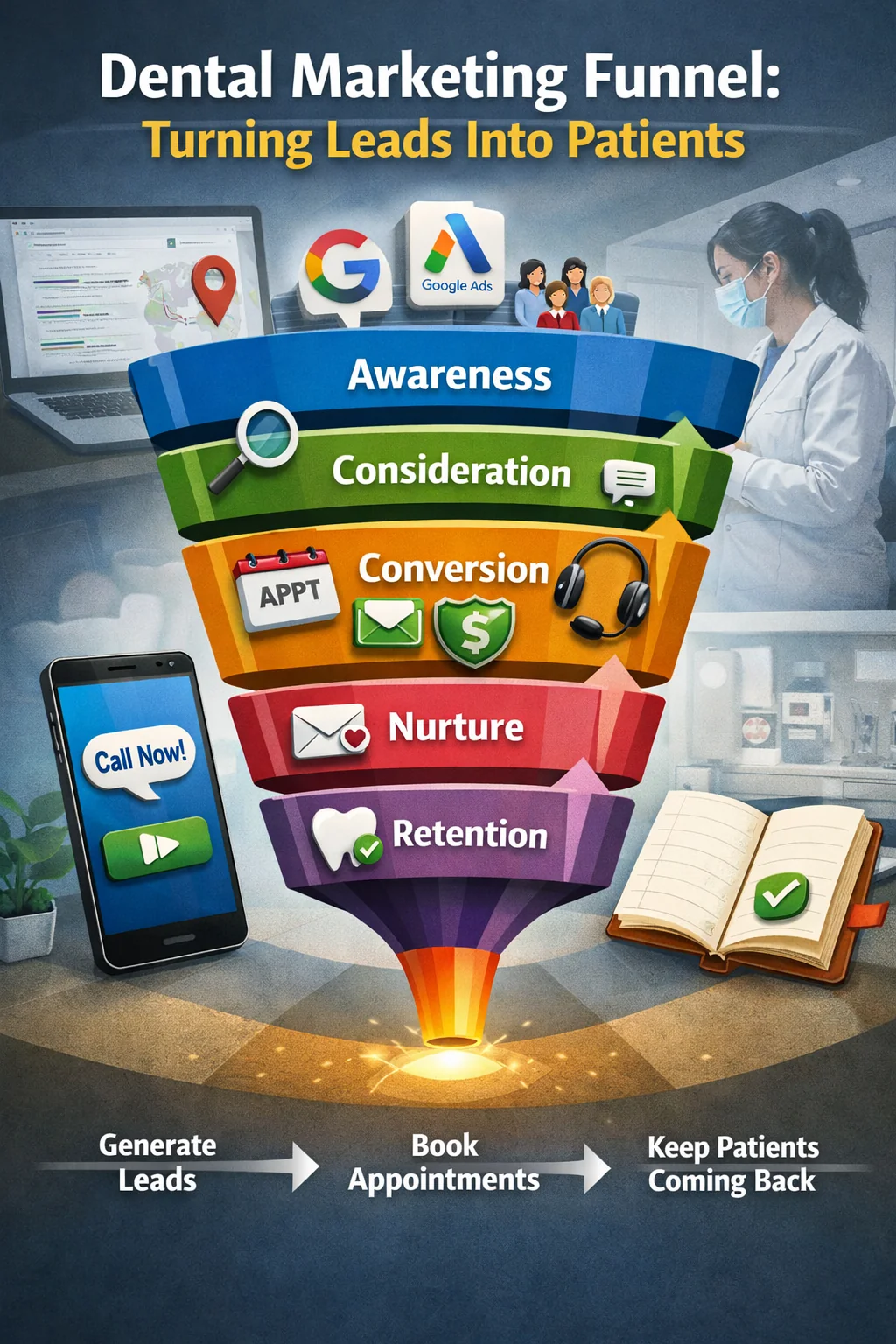 A dental marketing funnel is the full system that turns awareness into scheduled appointments, kept visits, and ongoing care. It includes how patients find you (local search, Google Business Profile, Google Ads, referrals), how they contact you (calls, forms, chat, online booking), and what happens next inside the practice (response speed, scripts, scheduling rules). When the funnel is defined as a system, you can improve one stage at a time instead of guessing what changed. A dental marketing funnel is the full system that turns awareness into scheduled appointments, kept visits, and ongoing care. It includes how patients find you (local search, Google Business Profile, Google Ads, referrals), how they contact you (calls, forms, chat, online booking), and what happens next inside the practice (response speed, scripts, scheduling rules). When the funnel is defined as a system, you can improve one stage at a time instead of guessing what changed.
This guide is written by the strategy team at WEO Media - Dental Marketing and reviewed through an operations-first lens: access, trust, schedule accuracy, and measurable handoffs. This content is educational and does not replace medical, legal, or compliance guidance.
Key Takeaways to Focus On This Week
- Lock definitions first - Define unique lead, merge window, kept visit, and staffed hours so your reporting doesn’t lie.
- Fix the lowest stage rate - The fastest gains usually come from response coverage and schedule-fit, not more traffic.
- Separate funnels by service-line - Emergency, new patient, hygiene (recare), and consult services behave differently and should not share one message or one metric set.
- Audit GBP routing monthly - Website and appointment links are often the highest-impact local conversion fix.
Jump To The Sections Most Practices Need First
Funnel At A Glance
A simple funnel map:
Source → intent page → contact method → human response → scheduled appointment → kept visit → next-care step
Key definitions that prevent reporting confusion:
| • |
Unique lead - One person identified by a primary key (usually phone and/or email) within the merge window, regardless of how many times they call, message, or submit a form. |
| • |
Source actions - A consistent set of measurable intent signals that can create leads, such as key-page sessions, Google Business Profile actions (calls, website clicks, direction requests, messages), and ad clicks. Define this once and keep it stable over time. |
| • |
Kept visit - A completed scheduled visit. Decide whether this includes same-day add-ons or only the primary new patient appointment, then report it the same way every month. |
Core funnel math:
| • |
Lead rate - Unique leads ÷ source actions. |
| • |
Lead-to-appointment - Scheduled appointments ÷ unique leads. |
| • |
Show rate - Kept visits ÷ scheduled appointments. |
A funnel improves fastest when you fix the lowest stage rate first, because that stage is usually where an operational constraint is hiding (coverage gaps, wrong appointment type, routing errors, or unclear expectations).
Why Dental Funnels Fail Even When Leads Look Good
When leads look strong but schedules feel unstable, the cause is rarely “bad marketing.” More often it is a mismatch between patient intent, access reality, and scheduling governance.
The most common failure patterns:
| • |
Access breaks - Call-first demand goes unanswered, forms wait too long, or after-hours leads have no reliable path back to a human. |
| • |
Trust breaks - Patients fear surprise bills, distrust “upselling,” or feel embarrassed about overdue care and stop engaging. |
| • |
Schedule breaks - Wrong appointment types, wrong provider routing, and high-variance bookings create reschedules and no-shows. |
| • |
Measurement breaks - Duplicate leads inflate volume, attribution drifts after site changes, and teams argue about “lead quality” without shared definitions. |
When the structure is right, the funnel reduces uncertainty quickly, aligns promises to real capacity, and makes the next step predictable for the patient.
Dental Funnel Stages With Unasked Questions, Failure Modes, And Fixes
Stage 1 - Awareness
Awareness is where patients discover a practice. The practical question is not “Did we get traffic?” It is “Did we attract the right local intent for the right service-line?”
Questions patients don’t ask out loud:
| • |
“Do you serve my area?” - Service-area mismatch wastes demand and depresses conversion before a lead exists. |
| • |
“Can you handle my situation?” - Emergency, consult, and routine needs behave differently and should not be blended into one message. |
| • |
“Are your hours and policies accurate?” - Inaccurate basics cause drop-off before contact ever happens. |
Operational fixes that improve qualified visibility:
| • |
Service-area qualifiers - Use clear, honest location language aligned to real travel patterns and routing rules. |
| • |
Service-line separation - Separate pages and messaging for emergency vs consult vs hygiene and recall (recare). |
| • |
Accuracy hygiene - Keep hours, NAP, and appointment routing accurate across key touchpoints. |
Stage 2 - Consideration
Consideration is where patients decide whether it feels safe to contact. In dentistry, choices are often shaped by fear, shame, pain, and distrust, not just price.
Questions driving hesitation:
| • |
“Will I get a surprise dental bill?” - Often appears as searches like “insurance estimate wrong” or “dentist overcharging.” |
| • |
“Are you going to upsell me?” - Skeptical patients respond better to clear decision points than persuasive claims. |
| • |
“Can you help if I’m anxious or sensitive?” - Phobia, trauma histories, and sensory sensitivities often require predictable steps and options. |
| • |
“Do I really need X-rays?” - Radiation concern is frequently a trust concern that needs calm explanation of purpose and process. |
| • |
“Will you judge me?” - Overdue care and oral health stigma can trigger avoidance unless language is shame-free. |
Fixes that reduce hesitation without hype:
| • |
Cost-trust transparency - Explain cost drivers and estimate timing rather than guessing exact totals. |
| • |
Decision-point clarity - Make it obvious when estimates are reviewed and when patients choose among options. |
| • |
Comfort pathway specifics - Offer predictable steps and accommodations without guaranteeing outcomes. |
| • |
Shame-free language - Use supportive “return path” wording for overdue care and missed appointments. |
Stage 3 - Conversion
Conversion is scheduling and routing. Most funnel leakage in dentistry happens here because response speed and schedule accuracy are operationally difficult.
Questions that decide the booking moment:
| • |
“Will a human answer?” - Call-first patients often stop trying after one missed call. |
| • |
“Can I book without calling?” - Some patients prefer text-first or chat-first for accessibility, anxiety, or work constraints. |
| • |
“Can you fit me in if I’m in pain?” - Emergency access expectations must be clear and capacity-aware. |
Fixes that stabilize lead-to-appointment:
| • |
Fallback paths - Overflow handling and after-hours workflows so calls and messages don’t disappear. |
| • |
Appointment-type governance - Standardized definitions across providers reduce wrong-fit bookings and reschedule loops. |
| • |
Text-first closure - Fast acknowledgment followed by a specific appointment offer reduces back-and-forth. |
| • |
Language routing - Capture preferred language and route to bilingual staff or an interpreter workflow when feasible. |
Stage 4 - Nurture
Nurture supports patients who are not ready to book immediately, especially for higher-consideration services or patients who need family or partner approval.
Nurture rules that keep trust intact:
| • |
Segment by service-line - Emergency needs, routine care, and consult services require different timing and content. |
| • |
Respect preferences - Store preferred channel and time window so follow-up feels helpful, not intrusive. |
| • |
One message, one purpose - Each touch should clarify one next step and keep boundaries clear. |
Stage 5 - Retention And Recall (Recare)
Retention protects kept visits and stabilizes growth. It reduces pressure on acquisition to “solve” an experience problem.
Retention levers that protect kept visits:
| • |
Reschedule friction - Make it easy to reschedule so “reschedule” wins over “ghost.” |
| • |
Shame-free reminders - Supportive language increases re-engagement for overdue or missed visits. |
| • |
Predictable next steps - Clear “what happens next” reduces anxiety and improves follow-through. |
Service-Line Funnel Examples People Search For
Different services behave differently because urgency, trust needs, and decision time are not the same. The goal is to structure each service-line funnel around its most common friction points and operational constraints.
Example 1: Emergency And Urgent Pain Funnel
Typical pattern: call-first demand, high sensitivity to access, and strong expectations about same-day availability.
A practical emergency funnel flow:
| • |
Awareness - High-intent local visibility plus clear emergency language that matches real capacity. |
| • |
Consideration - Set expectations: what “same-day” means and what happens when capacity is full. |
| • |
Conversion - Live-answer coverage, missed-call fallback, and defined emergency slot holdbacks. |
| • |
Retention - Clear next step after the urgent visit so patients don’t drop out of care. |
Operational guardrails:
| • |
Emergency holdbacks - Hold a limited number of slots, then release at defined times to avoid unused chair time. |
| • |
Overflow policy - If no same-day capacity exists, use an approved diversion path consistent with practice policy and safety boundaries. |
| • |
Routing clarity - Standardize what counts as “urgent” so the right appointment type is booked. |
Example 2: Implants And Higher-Consideration Consult Funnel
Typical pattern: longer decision cycles, higher cost-trust friction, and more education before booking.
A practical consult funnel flow:
| • |
Awareness - Intent-matched pages covering candidacy, timeline, and realistic expectations. |
| • |
Consideration - Explain cost factors, financing pathways in non-stigmatizing language, and what to expect at the consult. |
| • |
Conversion - Consult scheduling workflow, schedule-fit rules, and a clear handoff to a financial coordinator when appropriate. |
| • |
Nurture - Longer merge windows and preference-based follow-up that reduces “upselling” distrust. |
| • |
Retention - Clear next steps after consult and easy reschedule paths for long-cycle decisions. |
Channel Behavior With Best-Fit Use Cases, KPIs, And Common Pitfalls
Channels behave differently because they drive different intent and contact behavior. When you match the funnel to channel reality, you reduce missed opportunities and wrong-fit bookings.
Channel use case, primary KPI, and a common pitfall:
| • |
Google Business Profile (GBP) and local SEO
- Best fit: local, high-intent discovery; Primary KPI: listing actions and call answer rate; Pitfall: appointment links routing to the wrong location. |
| • |
Local Services Ads - Best fit: urgent, call-first volume; Primary KPI: answered calls that become booked appointments; Pitfall: staffing gaps create missed-call loss that looks like “lead quality.” |
| • |
Google Search Ads
- Best fit: explicit service intent capture; Primary KPI: cost per booked appointment using unique leads; Pitfall: mixing emergency and consult intent on one landing page. |
| • |
Paid social - Best fit: awareness and reminder-based nurture; Primary KPI: assisted bookings over time; Pitfall: optimizing to clicks instead of downstream scheduling outcomes. |
| • |
Referrals - Best fit: trust-forward acquisition; Primary KPI: schedule-fit and kept visits; Pitfall: assuming trust eliminates access friction like missed calls. |
Benchmarks People Search For With Strong Caveats
Benchmarks vary by market, staffing, hours, and service-line mix. The numbers below are starting points, not industry standards. They depend heavily on how unique leads are defined, how missed calls are handled, how long patients wait for appointments, and how “kept visit” is counted.
Benchmarks only matter if your definitions match these definitions.
Example response-time starting points:
| • |
Calls during staffed hours - Many teams aim to answer most calls live; if a call is missed, a common starting target is returning it within 5 to 15 minutes for urgent pain and within 30 to 60 minutes for standard requests when staffing allows. |
| • |
Forms and chat during staffed hours - Often treated as minutes, not hours, with a 5 to 15 minute starting target for human response when feasible. |
| • |
Text-first acknowledgment - Auto-acknowledgment is often immediate, followed by a human reply within 5 to 15 minutes during staffed hours when possible. |
| • |
After-hours leads - A common starting goal is response early next business morning, with an urgency triage path based on practice policy and safety boundaries. |
Example conversion starting points:
| • |
Call answer rate - Many offices use 70% to 90% during staffed hours as a starting internal target, then improve the worst time blocks first. |
| • |
Lead-to-appointment - Varies by service-line; 20% to 50% is a common starting range when definitions are clean and access is strong, with emergency and consult cycles behaving differently. |
| • |
Show rate - Improves when schedule-fit and reminders are strong; 70% to 90% is a common starting range depending on wait time and reschedule ease. |
| • |
No-show rate - 10% to 30% is a range many schedules recognize; the most productive lever is reducing wrong-fit bookings and lowering reschedule friction. |
Baseline-first method:
| 1. |
Measure baselines by channel and service-line using one consistent definition of unique lead and kept visit. |
| 2. |
Find the lowest stage rate and attach a reason category from outcomes data. |
| 3. |
Fix one leak for one week, then re-measure with the same rules. |
| 4. |
Only change targets after the process is stable and repeatable. |
Mini case example: recovering missed-call loss
A practice saw strong LSA volume but flat new patient growth. The baseline showed a call answer rate below target during two predictable time blocks (lunch and late afternoon). After adding a missed-call callback standard and a simple overflow path, the answer rate improved during those blocks and lead-to-appointment rose without increasing ad spend. The lesson: fix coverage and routing before you buy more traffic.
Minimum KPI Dashboard Example
A minimum dashboard should answer two questions: “Where is the leak?” and “Is it getting better?” A practical version is split by channel and by service-line.
| • |
By channel - Unique leads, call answer rate, lead-to-appointment, show rate, and cost per scheduled appointment. |
| • |
By service-line - The same metrics plus schedule-fit rate and average wait time to appointment. |
| • |
By time block - Answer rate and response time by hour and day to find predictable coverage gaps. |
| • |
By outcome tags - The top reasons for “not booked,” reschedules, and no-shows. |
Cost Metrics Tied To Outcomes
Cost per lead can mislead when duplicates inflate counts or when “leads” include spam and wrong numbers. A cleaner approach is to tie cost to downstream outcomes.
| • |
Cost per scheduled appointment - Spend ÷ scheduled appointments (using your unique-lead and outcome rules). |
| • |
Cost per kept visit - Spend ÷ kept visits, which often aligns better with staffing and production planning. |
| • |
Cost per schedule-fit appointment - Spend ÷ appointments that were booked correctly for the right visit type, location, and provider without avoidable reschedules. |
Dental Lead Response-Time SLA And How To Measure It
SLA means service-level agreement. In dentistry, an SLA only works when it matches coverage reality: lunch, busy hours, and after-hours.
A practical SLA ladder:
| • |
Acknowledge - Confirm receipt and set expectation for when a human will respond. |
| • |
Human connect - A staff member calls or replies within the SLA window. |
| • |
Booking close - Offer a specific appointment time and confirm type, location, and next steps. |
How to measure response time consistently:
| • |
Start timestamp - When the lead is created (call received, form submitted, chat started, booking request created). |
| • |
End timestamp - First human contact attempt or connection, based on your chosen definition, tracked by channel. |
| • |
Channel separation - Measure calls, forms, chat, and text separately because patient behavior differs by channel. |
| • |
Time window rules - Define whether after-hours are excluded, and report them separately to avoid distorting staffed-hour performance. |
Call Answer Rate Formula And What Counts
Answer rate only helps when everyone uses the same definition and the same time window.
A practical formula:
| • |
Answer rate - Answered calls ÷ total inbound calls during staffed hours. |
| • |
Staffed hours - The time window when a human is expected to answer, which may differ from posted hours. |
Common call reporting definitions:
| • |
Answered call - Connected to a staff member or answering service that can route or schedule. |
| • |
Abandoned call - Caller hangs up before connection, often due to holds or complex menus. |
| • |
Short-call threshold - Calls under 10 to 20 seconds are often separated for analysis because they may represent misdials, spam, or immediate hang-ups; define the threshold once and keep it consistent. |
| • |
After-hours calls - Report separately with their own callback SLA so they do not distort staffed-hour answer rate. |
Front Desk Standards And Micro-Dialogues That Protect Trust
Scripts work best as standards, not rigid lines. The goal is consistent clarity, empathy, and expectation setting.
Core standards:
| • |
Fast reason capture - Identify reason category and urgency quickly so the right appointment type is offered. |
| • |
Cost-trust framing - Explain cost drivers and decision points without guessing exact totals. |
| • |
Comfort pathway - Offer predictable steps and choice points without overpromising outcomes. |
| • |
Close with specifics - Offer a specific appointment time instead of open-ended scheduling questions. |
Cost-trust micro-dialogue:
| • |
Patient - “I need an exact price before I book.” |
| • |
Team - “Totally understandable. Exact pricing depends on what we find and which option you choose.” |
| • |
Team - “What I can do now is explain the main cost drivers and what the first visit includes.” |
| • |
Team - “Before any treatment decisions, we review estimates so there are no surprises.” |
Emergency availability expectation micro-dialogue:
| • |
Patient - “I need to be seen today.” |
| • |
Team - “I’m sorry you’re dealing with that. We’ll do our best based on today’s capacity.” |
| • |
Team - “One quick question so we schedule the right visit type, then I’ll share the next available options.” |
| • |
Team - “If same-day isn’t available, we’ll offer the soonest opening and explain next steps based on our policy.” |
Missed-call callback micro-dialogue:
| • |
Team - “Hi, this is the office returning your call. I’m sorry we missed you.” |
| • |
Team - “Are you calling about urgent pain, a new patient visit, or a routine appointment?” |
| • |
Team - “If now isn’t a good time, share a preferred time window and whether you prefer call or text.” |
Minimum Short Form Spec That Balances Speed And Scheduling Accuracy
Short forms convert better when they collect only what is needed to schedule accurately and route correctly.
Recommended short form fields:
| • |
First name - Enough to personalize replies without increasing friction. |
| • |
Phone number - Primary callback path for call-first and text-first workflows. |
| • |
Email - Optional for patients who prefer email confirmations and longer-form instructions. |
| • |
Preferred contact method - Call, text, or email, stored for follow-up preferences. |
| • |
Reason category - A simple dropdown such as urgent pain, new patient exam, consult, existing patient, other. |
| • |
Preferred time window - Morning, afternoon, evenings, specific days, or “first available.” |
| • |
Location selection - Required for multi-location routing accuracy. |
| • |
Consent and opt-out clarity - Clear acknowledgment of contact method and how to stop messages, aligned to policy and jurisdiction. |
A form quality rule that prevents oversharing:
| • |
Prompt patients not to share private medical details - Ask for a reason category and scheduling needs, not diagnosis descriptions, especially for chat and text. |
Outcome Tagging Taxonomy For Clean Reporting
Outcome tags reduce blame loops because they translate “lead quality” into observable reasons and fixable processes.
Minimum outcome tags:
| • |
Answered and booked - Scheduled with correct type and location. |
| • |
Answered and not booked - Not booked with reason category (availability, cost timing, insurance question, needs partner approval, prefers different channel). |
| • |
Voicemail left - Missed call with voicemail and next action recorded. |
| • |
Abandoned - Hung up before connection, often tied to holds or menus. |
| • |
Spam or wrong number - Tracked for filtering improvements and excluded from performance decisions. |
| • |
Rescheduled - Scheduled then moved, with reason category if possible. |
| • |
No-show - Scheduled but not kept, tracked separately from reschedules. |
Scheduling Governance And Schedule-Fit Rate
Funnels break when marketing volume exceeds clinical capacity or when appointment types are inconsistent across providers and locations.
Capacity structure basics:
| • |
Service-line caps - Weekly slot budgets for emergencies, exams, consults, and hygiene or recall (recare) aligned to chair time. |
| • |
Emergency holdbacks - Protect access with holdback slots and defined release times. |
| • |
Overflow policy - A defined plan for when same-day capacity is full that stays consistent across scripts and pages. |
Schedule-fit rate definition:
Schedule-fit rate is the percentage of booked appointments that match intended visit type, provider, location, and urgency level without avoidable reschedules.
How to measure schedule-fit consistently:
| • |
Weekly sample - Review a small set of bookings for fit vs wrong type vs rescheduled. |
| • |
Tag reasons - Wrong type, wrong provider, wrong location, incomplete information, capacity mismatch. |
| • |
Fix rules, not one-offs - Update appointment definitions and routing rules to prevent repeat errors. |
Duplicate Leads And Merge Window Days With A Worked Example
Duplicate leads inflate volume, distort cost per lead, and create “lead quality” arguments when the real issue is counting and routing.
Merge window days are the number of days used to merge multiple touches from the same person into one unique lead. The right window depends on the service cycle.
Starting-point merge windows, with results varying:
| • |
Urgent needs - 1 to 7 days is a common starting range because decisions happen quickly and repeat contacts cluster. |
| • |
General new patient care - 7 to 14 days is a common starting range to merge calls, forms, and chat during one shopping cycle. |
| • |
Higher-consideration consults - 30 to 90 days is a common starting range because patients may return multiple times while deciding. |
Worked example (illustrative):
A practice reports 120 leads in a month. After merging duplicates, there are 80 unique leads. If 28 appointments were scheduled and 22 were kept, then lead-to-appointment is 28 ÷ 80 = 35%, and show rate is 22 ÷ 28 ≈ 79%.
GBP Link Hygiene, UTM Parameters, And Routing Checks
Google Business Profile (GBP) often behaves like a call-first channel. Small routing mistakes here can create outsized conversion losses.
UTM parameters are tracking parameters added to links to help attribute traffic sources in analytics. If they are used, they should be consistent and tested so they do not break booking flows or create double-counting.
GBP conversion checks to run regularly:
| • |
What actions matter - Calls, website clicks, direction requests, and messages are common high-intent actions to monitor. |
| • |
Website link - Confirm it routes to the correct location experience and works on mobile. |
| • |
Appointment link - Confirm it routes to the correct location and the correct booking path. |
| • |
UTM consistency - If UTMs are used for measurement, verify they do not break booking flows or create duplicate tracking. |
| • |
Wrong-location prevention - For multi-location practices, confirm each profile links to the correct location page and booking path, then recheck after any hours or service updates. |
DNI, NAP, And Drift Detection With Concrete Don’ts
DNI means dynamic number insertion, which swaps phone numbers for attribution so call sources can be measured. NAP means name, address, phone consistency across listings. The goal is to measure calls without harming local consistency or confusing patients.
Principles:
| • |
Keep core NAP stable - Primary listings should show the correct, consistent phone number. |
| • |
Use controlled DNI on-site - Apply DNI where attribution is needed and avoid changing numbers in core NAP placements. |
| • |
Audit after updates - Validate number display, routing, and attribution after site or tag changes. |
DNI and NAP don’ts:
| • |
Don’t - Place tracking numbers in core citations or primary GBP phone fields where NAP consistency matters most. |
| • |
Don’t - Let DNI override the primary number in key NAP areas like sitewide footers, contact pages, or structured data if it creates inconsistency. |
| • |
Don’t - Run multiple tracking scripts that compete; it can degrade site speed and create attribution conflicts. |
| • |
Don’t - Skip audits after site changes; CMS components can unintentionally insert phone numbers sitewide. |
| • |
Don’t - Treat “start booking” as booking completion; measure completion at confirmation to avoid double-counting. |
Drift detection checklist:
| • |
UTM persistence - Confirm UTMs pass through forms and booking flows without being stripped. |
| • |
True booking completion - Track confirmation, not intent-to-book clicks. |
| • |
Double-count prevention - Ensure one person does not fire multiple conversion events across tools. |
| • |
Multi-location routing validation - Test that calls and forms route to the correct location consistently. |
| • |
Site performance monitoring - Watch for page speed regressions after adding scripts or widgets. |
Insurance Language Patterns With Safe Example Phrases
Insurance wording is a common trust trigger. Overstating coverage can backfire, while vague wording can create avoidable hesitation.
Safe wording patterns:
| • |
In-network phrasing - “We are in-network with select plans. Coverage depends on your specific benefits.” |
| • |
Accepts phrasing - “We accept many PPO plans. We can review benefits and explain expected costs before treatment decisions.” |
| • |
Estimate process phrasing - “We can provide an estimate after evaluation and benefit review. Final cost depends on findings and the option you choose.” |
| • |
Common mistake to avoid - Confusing “accepts” with “in-network,” which can create surprise-bill fear and mistrust. |
Landing Page Must-Haves By Intent Stage
Landing pages convert best when they answer key questions quickly without forcing patients to hunt for basics.
Minimum landing page must-haves:
| • |
Primary and fallback CTA - One main contact path plus a second option for accessibility or high call volume. |
| • |
Hours and after-hours expectations - Clear expectations for response timing and urgent requests. |
| • |
Insurance language clarity - “In-network vs accepts” phrasing that reduces misunderstanding. |
| • |
What to expect - A simple outline of the first visit and the next decision point for estimates and options. |
| • |
Service-line routing - Emergency vs routine vs consult paths should not conflict. |
| • |
Location accuracy - Correct location selection and routing for multi-location practices. |
| • |
Trust signals with boundaries - Reviews, credentials, and process clarity without guarantees or “painless” claims. |
Language Support And Accessibility With Practical Workflow Details
Language support and accessibility improve conversion when they are designed as workflows, not just promises on a page.
A practical language support workflow:
| • |
Capture preferred language early - Simple field and call note so the next touch is routed correctly. |
| • |
Bilingual routing hours - Define coverage hours so the team does not promise what cannot be delivered. |
| • |
Interpreter workflow - Use a consistent internal note standard to trigger interpreter support when needed, without collecting unnecessary private details. |
| • |
Translate in priority order - Location pages, primary service-line pages, what-to-expect pages, cost factors, and scheduling instructions. |
| • |
Translation QA - Verify tone, cultural appropriateness, and clarity, not just literal translation. |
Minimum accessible booking checklist:
| • |
Labeled fields - Clear labels and error messages that explain what to fix. |
| • |
Keyboard navigation - Forms and booking flows work without a mouse. |
| • |
Readable confirmations - Confirmation screens clearly show location, time, and visit type. |
| • |
Alternate contact paths - Call, text, and form options exist for patients who cannot or prefer not to call. |
| • |
Short forms - Only require the minimum fields needed to schedule accurately. |
WCAG means Web Content Accessibility Guidelines. Many teams use WCAG 2.1 AA-style practices as a practical baseline, and WCAG 2.2 extends WCAG 2.1 with additional success criteria that can further improve usability for forms and booking flows.
Local SEO Conversion And Location Page Must-Haves
Local conversion is often won or lost on basics like accuracy, routing, and expectation setting.
Conversion-critical local items:
| • |
Accurate categories and services - Align visibility with the right service intent. |
| • |
Accurate hours - Prevent “closed when you said open” frustration and drop-off. |
| • |
Consistent NAP
- Reduce confusion and support stable local presence. |
| • |
Correct appointment routing - Website and appointment links route to the correct location and working booking path. |
| • |
Review response hygiene - Respond professionally without confirming private patient details. |
Location page conversion add-ons:
| • |
After-hours instructions - Honest expectations about response timing and next steps. |
| • |
Emergency access expectations - What “same-day” means and what happens when capacity is full. |
| • |
Insurance wording clarity - Reduce cost-trust confusion and prevent misunderstanding. |
| • |
Parking and access notes - Simple directions that reduce late arrivals and missed visits. |
| • |
Accessibility notes - Clear information about accommodations where applicable. |
Review Acquisition And Review Response With Ethical Guardrails
Reviews can influence every stage of the funnel. Two separate systems matter: earning reviews ethically and responding safely.
Review acquisition principles:
| • |
Ask at the right moment - After a completed visit when the experience is fresh, not during a stressful or unresolved issue. |
| • |
Make it simple - One clear path rather than multiple competing asks. |
| • |
Avoid pressure - Requests should feel optional, not transactional. |
| • |
Don’t filter unfairly - Treat feedback consistently rather than only asking certain patient types. |
Review response rules:
| • |
Do - Respond with empathy and an invitation to resolve offline without confirming the person is a patient. |
| • |
Do - Address the theme (wait time, billing confusion, scheduling difficulty) without specifics. |
| • |
Don’t - Share appointment details, clinical details, or any identifying information. |
| • |
Don’t - Argue publicly or imply the reviewer is wrong about clinical facts. |
Compliance And Safety Boundaries With Practical Examples
This section is educational and does not replace legal guidance. Requirements vary by jurisdiction, message type, platform policies, and vendor role.
What these frameworks mean in practice:
| • |
HIPAA and BAA
- Minimize PHI in marketing capture points, limit access to lead data and call recordings, and understand when vendor access can require a business associate agreement. Whether data is PHI can depend on context and implementation details. |
| • |
TCPA and consent - Certain marketing texts and some types of calls can require a higher consent standard depending on implementation details. Opt-outs should be honored promptly, and stop instructions should be easy to understand. |
| • |
CAN-SPAM - Applies to commercial email. Common expectations include a clear opt-out mechanism, avoiding deceptive headers or subject lines, and including a valid physical postal address. |
| • |
Call recording rules - Disclosure requirements vary by jurisdiction. In the U.S., some states are one-party consent and others require all-party consent, and multi-state calls can be complex. |
| • |
WCAG - Focus on usability: labeled fields, keyboard navigation, and accessible booking flows that do not trap users. |
PHI minimization do and don’t:
| • |
Do - Collect the minimum needed to schedule: contact info, reason category, preferred times, location choice. |
| • |
Do - Use prompts that discourage detailed medical narratives in forms, chat, and text. |
| • |
Don’t - Invite diagnosis details, images, or medical history through general marketing forms. |
| • |
Don’t - Confirm a patient relationship or details in public review responses. |
Clinical advice scope boundary for chat and text:
| • |
Boundary - “For safety, we can’t diagnose or give medical advice by text or chat.” |
| • |
Next step - “We can help schedule a visit or arrange a call with our team.” |
| • |
Safety line - “If symptoms feel life-threatening, use local emergency services.” |
Online Booking Guardrails With Low-Variance And High-Variance Examples
Online booking can improve accessibility, but it can also create schedule pollution if high-variance needs are allowed to book without guardrails. A safer approach is to match booking method to appointment variance.
Examples:
| • |
Low-variance - Hygiene recall (recare) slots and standardized exam slots when appointment definitions are consistent. |
| • |
Guardrailed - Straightforward new patient visits with required reason prompts, confirmation rules, and location selection checks. |
| • |
Not ideal - Urgent pain triage and complex consults that require routing to specific providers or time blocks unless strict guardrails exist. |
No-Show And Reschedule Friction Mini-Module
No-shows and last-minute cancellations often rise when appointments are wrong-fit, expectations are unclear, or rescheduling is harder than disappearing.
Operational levers that reduce no-shows:
| • |
Schedule-fit first - Wrong appointment type and long waits increase cancellations and no-shows. |
| • |
Expectation setting - Confirm what the visit is for and what happens next in plain language. |
| • |
Two-way reminders - Let patients confirm or request reschedule without phone-tag loops. |
| • |
Lower reschedule friction - Provide an easy path to choose a new time, which protects kept visits. |
| • |
Emergency clarity - Honest triage expectations reduce frustration and negative reviews. |
Attribution Clarity For Booked vs. Kept
Attribution can be done by first-touch lead source, last-touch source before booking, or a consistent “primary source” rule; the most important factor is choosing one method and applying it consistently so trends reflect real funnel changes instead of reporting changes.
Nurture Example Templates That Don’t Feel Salesy
One small, respectful template often performs better than long sequences. The goal is clarity and a simple next step, not pressure.
Missed-call text example:
| • |
Message 1 - “Hi, we missed your call. Are you reaching out about urgent pain, a new patient visit, or a routine appointment?” |
| • |
Message 2 - “If you share your preferred time window, we can offer the next available options.” |
| • |
Message 3 - “If you prefer not to text, you can reply ‘call’ and we’ll try again during your preferred time.” |
Consult follow-up example:
| • |
Message - "Thanks for reaching out. The first step is a consult where options and estimates are reviewed before decisions. Would you like the next available consult time this week or next?" |
A Simple Funnel Template Readers Can Copy
Use this as a weekly operating template. Keep the definitions the same month to month.
| • |
Awareness - KPI: source actions by channel; Owner: marketing partner; Tool/source: GBP insights, analytics, ad platform reports. |
| • |
Lead capture - KPI: unique leads; Owner: marketing partner and office manager; Tool/source: call tracking, forms, chat logs. |
| • |
Speed - KPI: response time by channel; Owner: front desk lead; Tool/source: phone and messaging logs. |
| • |
Scheduling - KPI: lead-to-appointment and schedule-fit rate; Owner: office manager; Tool/source: PMS scheduling data and outcomes tags. |
| • |
Attendance - KPI: show rate and no-show rate; Owner: office manager and clinical lead; Tool/source: kept visit reporting. |
| • |
Retention - KPI: reactivation and recall (recare) stability; Owner: office manager; Tool/source: recall lists and visit history. |
Week 1 Implementation Checklist
| 1. |
Write the funnel path from source to kept visit and assign an owner to each handoff. |
| 2. |
Define unique lead, merge window days, kept visit, source actions, and staffed hours so everyone reports the same way. |
| 3. |
Set a response-time SLA ladder and define the missed-call and after-hours fallback path. |
| 4. |
Add outcome tags and capture “not booked” reasons consistently for one week. |
| 5. |
Validate GBP website and appointment links and confirm correct routing for each location. |
| 6. |
Confirm tracking integrity after any site or tag changes, including true booking completion. |
FAQs
What is a dental marketing funnel?
A dental marketing funnel is the full system that turns awareness into scheduled appointments, kept visits, and ongoing care. It includes discovery channels, intent-matched pages, contact methods, response workflows, scheduling rules, and stage-based measurement so the biggest leak can be identified and fixed.
What is a unique lead in dental marketing reporting?
A unique lead is one person identified by a primary key such as phone and/or email within the merge window, regardless of how many times they call, submit a form, or message. Separating unique leads from total touches reduces duplicate counting and improves decision-making.
How do you calculate call answer rate for a dental office?
A practical definition is answered calls divided by total inbound calls during staffed hours. To keep reporting consistent, define staffed hours, separate after-hours calls, and decide how abandoned and short calls are categorized.
How long should merge window days be for duplicate dental leads?
Merge window days depend on the service cycle. Urgent needs often use shorter windows because decisions happen quickly, while higher-consideration consult services may use longer windows because patients can return multiple times while deciding. The key is choosing consistent merge rules and reporting unique leads separately from total touches.
What are DNI and NAP, and why do they matter for dental call tracking?
DNI is dynamic number insertion used to attribute calls to traffic sources, while NAP refers to consistent name, address, and phone information across listings. A common approach is to keep core NAP consistent in public listings while using controlled DNI on the website and auditing after changes to protect both measurement and local consistency. |
|





